How to Build a Successful KDP Coloring Book Using Bold Easy Creepy Monster Pages
Creating a successful coloring book on Amazon KDP requires more than just a collection of images. It demands a structured workflow, high-quality assets, and a clear understanding of the platform’s technical requirements. The Bold Easy Creepy Monster Coloring Pages asset pack is designed to streamline this entire process, giving you the flexibility to produce a professional interior quickly. This article outlines exactly how to integrate these assets into your publishing pipeline, from initial preparation to final upload and long-term use.
What the Asset Pack Provides for Your Production Pipeline
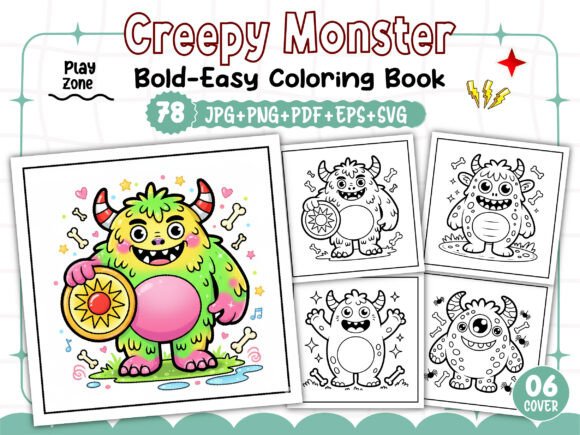
Before diving into the workflow, it is important to understand exactly what you are working with. This kit is not just a set of images; it is a modular production system. It includes 78 unique black-and-white designs in multiple formats, plus a dedicated cover asset set. The specific contents allow you to choose the path of least resistance based on your technical comfort level.
File Formats and Their Specific Roles
Each format serves a distinct purpose in a professional content creation workflow:
- PDF Print Ready: The 01 PDF file is your direct path to publication. If your goal is to assemble a book quickly, this file is pre-formatted to 8.5” x 8.5” at 300 DPI. You can use this as your base manuscript, adding only your front and back matter.
- EPS and SVG Files: These 78 files are vector-based. For professionals using Adobe Illustrator or Affinity Designer, these are critical. Vectors allow for scaling without loss of quality, adjusting line thickness, or even recoloring elements for marketing materials or experimental editions.
- JPG and PNG Files (300 DPI): These raster formats are perfect for drag-and-drop tools like Canva, Microsoft Word, or Apple Pages. The 300 DPI resolution ensures that when you place these into an 8.5” x 8.5” document, the lines remain sharp and free of pixelation.
- 06 PNG Images for Cover: A common bottleneck is creating a cohesive cover. These six dedicated images allow you to design a front and back cover that matches the interior style perfectly, maintaining brand consistency.
Integrating the Assets into Your KDP Workflow
The true value of this pack lies in how it fits into your specific production process. Whether you are a seasoned publisher or launching your first title, the workflow can be adapted to save time and reduce errors.
Pre-Production: Asset Organization and Audit
Preparation prevents poor performance. Begin by unzipping the delivered files and organizing them into folders: Interior_SVG, Interior_PNG, Cover_Assets, and Master_PDF. Before any assembly, open a few of the JPG files and the PDF. Verify the line weight. The “Bold and Easy” style is intentional; thick lines are forgiving for the end user and print reliably without bleeding or fading, which is a key quality control metric for KDP books.
Assembly: Three Pathways for Different Skill Levels
You have three distinct routes to assemble your interior. Choose based on your software and time constraints.
Path 1: The Direct PDF Route
This is the fastest method. Open the provided PDF in a program like Adobe Acrobat Pro or a free alternative like PDFescape. Add your title page, copyright page, and a “This book belongs to” page at the front. Ensure the total page count is divisible by 4 (for standard KDP printing). This method takes approximately 30 minutes and is ideal for testing a niche quickly.
Path 2: The Vector Customization Route
For publishers who want a unique layout or plan to launch a series with a specific grid structure, use the SVG or EPS files. Import them into design software. You can mirror images, create full-page bleeds, or adjust contrast. This workflow takes longer (around 2-3 hours) but gives you total control over the final product and ensures your book does not look identical to others using the same base pack.
Path 3: The Raster Assembly Route
If you use Canva or Word, the 78 PNG files are your best asset. Create a new document set to 8.5” x 8.5” inches. Set the DPI to 300 if your software allows it. Drag each PNG onto a new page. Because the images are already high resolution, you avoid the common problem of blurry prints caused by low-resolution stock art. This method balances speed and customization.
Practical Implementation Tips for a Flawless Launch
Publishing on KDP requires strict adherence to technical specs. Here is how to use this asset kit to meet those requirements without friction.
Managing Bleed and Margins
The standard trim size for this kit is 8.5” x 8.5”. KDP offers two upload options: one with bleed and one without. The provided assets are designed for the trim size. If you choose the Direct PDF Route, you can upload the file directly to KDP and select “No Bleed” during setup. If you want bleeds (to extend the background color to the edge), you will need to use the SVG or EPS files to expand the canvas to 8.75” x 8.75” and add a background element. This is a crucial step for maintaining print quality if your book includes colored backgrounds on the cover.
Leveraging the Cover Assets for Branding
The included 06 PNG Images are not just decoration; they are the foundation of your book’s market presence. To build a recognizable brand, use one of these images as the central focal point for your cover. Match the title font to the tone of the monster designs—a clean sans-serif font often works best for “Bold and Easy” themes. Use the same cover layout style across multiple volumes to create a series that browsers on Amazon can instantly recognize. Consistency across interiors and covers reduces buyer hesitation.
Quality Control Checks Before Upload
Before hitting publish, run these checks:
- Line Integrity: Zoom into the PDF at 400%. The lines should be solid black (K100), not grey. This ensures crisp printing.
- Page Count: Aim for a minimum of 78 pages (your images) plus 4 to 8 pages of front matter. An 82 to 86-page book is a solid value for the price point of $5.99 to $7.99.
- Previewer Test: Use the KDP Online Previewer. Check a random page from the beginning, middle, and end. Verify that no images are shifted, cut off, or distorted.
Extending the Life of Your Assets Beyond the Book
A practical workflow considers long-term utility. The 78 SVG Files are a particularly valuable asset for extending your brand beyond the KDP book.
Repurposing for Print-on-Demand Merchandise
SVG files are the industry standard for print-on-demand platforms like Redbubble, Teespring, and Merch by Amazon. Because the monsters are “Bold and Easy,” they translate perfectly onto t-shirts, mugs, and tote bags. You can take a single monster SVG, resize it, and list it as a sticker or t-shirt design. This creates an additional passive income stream from the same initial asset purchase.
Building a Lead Magnet or Email List
Use the JPG renderings to create a free “Creepy Monster Coloring Sampler.” Offer it as a lead magnet on your author website or social media. This builds an audience of engaged fans who are likely to purchase your full book upon release. This directly supports the E-E-A-T principle by establishing you as an active creator in the niche.
Creating a Volume Series
Since you have 78 unique images, you can split them logically. Volume 1 could feature 40 monsters, and Volume 2 the remaining 38 plus a few bonus designs you create yourself. Using the provided EPS files, you can modify existing monsters slightly to create “new” variations, effectively doubling your catalog with strategic edits.
Why This Workflow Suits the Current Market
The adult coloring book market has matured. Customers now look for specific niches and high-quality line art. The “Creepy Monster” niche has a dedicated audience that values gothic, spooky, and whimsical themes. The Bold and Easy format specifically targets colorists who want a relaxing experience without intricate, frustrating details.
By using this asset pack, you are directly addressing a proven demand. The workflow outlined here—from organizing files to repurposing vectors—ensures that you are not just publishing a book, but building a sustainable product line. The technical specifications (300 DPI, 8.5” x 8.5”, multiple formats) are not just bullet points; they are the foundation of a professionally managed KDP business.
Whether you choose the rapid deployment of the PDF or the flexible customization of the SVGs, the goal remains the same: deliver a high-quality product to a waiting audience with maximum efficiency and minimum technical friction.